
Internal Tools
Custom dashboards, admin panels, and internal apps that replace spreadsheets and manual processes. Built around your workflow, not against it.
Custom Software Development
Reeves Digital Systems builds custom applications, portals, and AI-powered tools for small businesses, startups, and organizations that need more than off-the-shelf software.
You own the code, the data, and the infrastructure after final payment. No lock-in. Fixed-scope pricing.
What I Build
Every project is built from scratch — no templates, no page builders, no recycled code. You get software that fits your process, not the other way around.
Custom dashboards, admin panels, and internal apps that replace spreadsheets and manual processes. Built around your workflow, not against it.
Secure, branded portals where your customers can log in, manage accounts, view data, and self-serve without picking up the phone.
Applications with AI features — document processing, intelligent search, chat assistants, and automated classification. Practical AI, not gimmicks.
Systems that connect your tools, eliminate repetitive tasks, and keep data in sync across platforms. Less manual work, fewer mistakes.
Multi-tenant subscription products with billing, user management, and scalable architecture. Everything you need to launch a real software product.
Membership management, scheduling, communication, and giving tools built for ministry and mission-driven organizations.
Selected Work
A sample of applications built across web, mobile, and AI — from SaaS platforms to native iOS apps. Each one is custom-built, deployed, and maintained. Click a tab to see what it does.

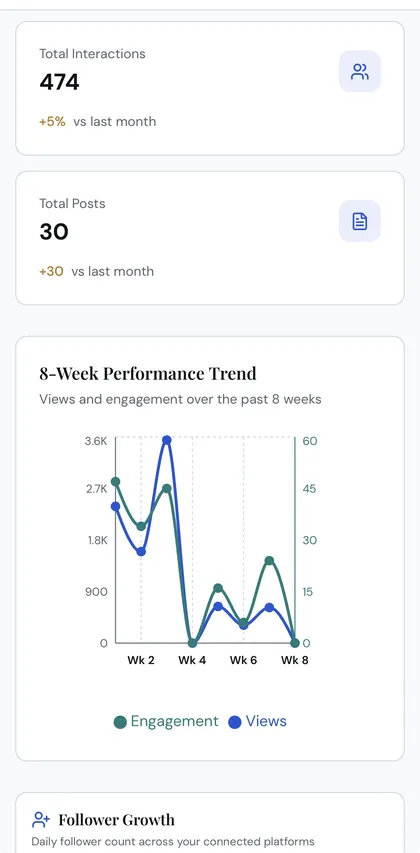
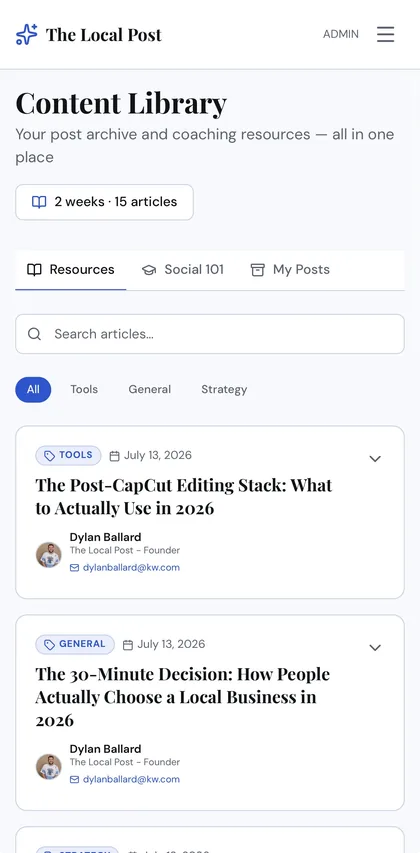
The Local Post is an AI-powered content intelligence platform for local professionals. It includes client onboarding, AI-generated content calendars, profile surveys, content history, Brand Brain memory, admin tools, social analytics, integrations, and a content library.
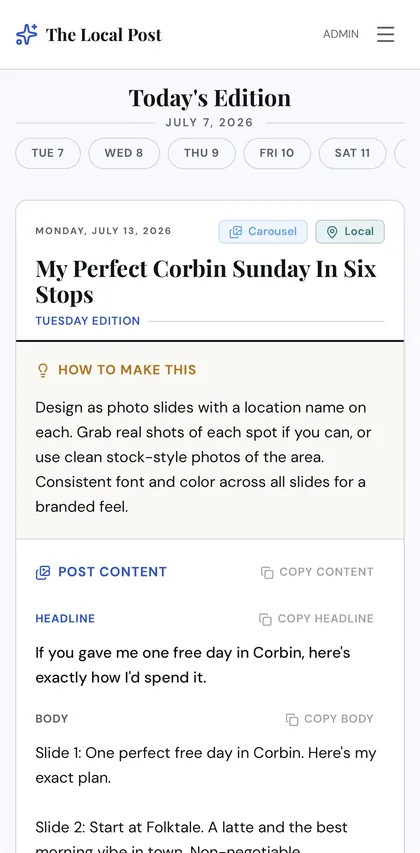
Generates personalized weekly content plans using Anthropic Claude. Each calendar day includes a hook, full post body, CTA, caption with hashtags, filming directions, and music suggestions. Content is tailored to the user's brand voice, industry, posting goals, and anti-brand words. A content freshness system reviews recent archived posts, used hooks, themes, archetypes, and feedback history to reduce repetitive AI output over time.
Syncs post-level analytics across Instagram, TikTok, YouTube, LinkedIn, and Facebook via the Zernio API. Includes follower growth charts, best-time-to-post heatmaps, demographic breakdowns, retention curves, content decay analysis, and posting frequency insights. AI-generated weekly strategy notes summarize performance and recommend adjustments.
A persistent memory system that continuously learns about each creator. Memories are categorized by type — identity, voice, audience, content, performance, strategy, preference, warnings — and automatically extracted from questionnaires, surveys, analytics patterns, and content feedback. High-confidence memories are injected into every AI prompt to improve content quality over time.
Four personality surveys (The Local Mayor, Trench Warfare, Origin Story, Client Avatar) plus weekly and monthly timed context surveys that refresh on a schedule. All survey answers feed into the AI calendar generation prompt as deep context, with monthly themes threading a content arc through each week's posts.
Full agency management tools: client roster with plan and role management, bulk invite system, email broadcast composer with AI-enhanced subject lines and scheduling, resource article editor with rich text (Tiptap), bug report triage, AI memory management, and platform settings with encrypted API key storage.
Three plans — Calendar Only, Creator, and Pro — gating access to analytics, integrations, and connected account limits. Invite-only registration with token-gated onboarding, password reset flows, and email unsubscribe system with HMAC-signed tokens.
Admins can compose, AI-enhance, schedule, and send segmented email broadcasts to all users or specific plan tiers. Per-recipient tracking with Resend analytics sync — delivered, bounced, opened, clicked. Automated unsubscribe footers with token-verified opt-out.
Three-tab archive: admin-authored resource articles (rich text, categorized, with author bylines), a Social 101 educational section, and a My Posts archive of every generated calendar day that was marked as posted. Content feedback (thumbs up/down) feeds back into the AI learning pipeline.

A native iOS app delivering real-time NCAA Division I baseball and softball scores, play-by-play, rankings, rosters, and news — all in one place. College diamond sports have a data problem: no single reliable source exists the way there is for the NFL or NBA. College Diamond fixes this by aggregating and reconciling data from multiple APIs into a single, comprehensive, real-time experience. Built for the journey from Opening Day to Omaha and Oklahoma City.
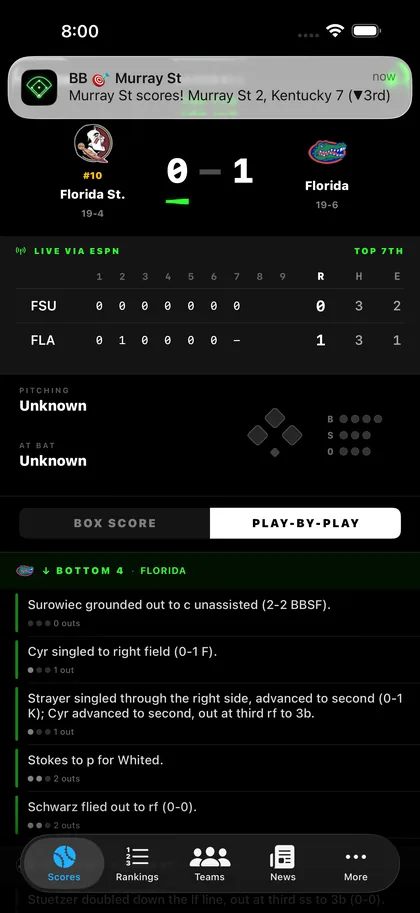
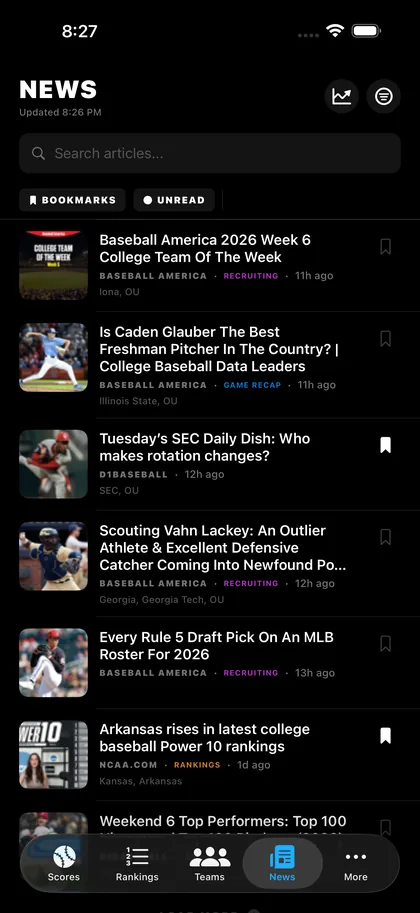
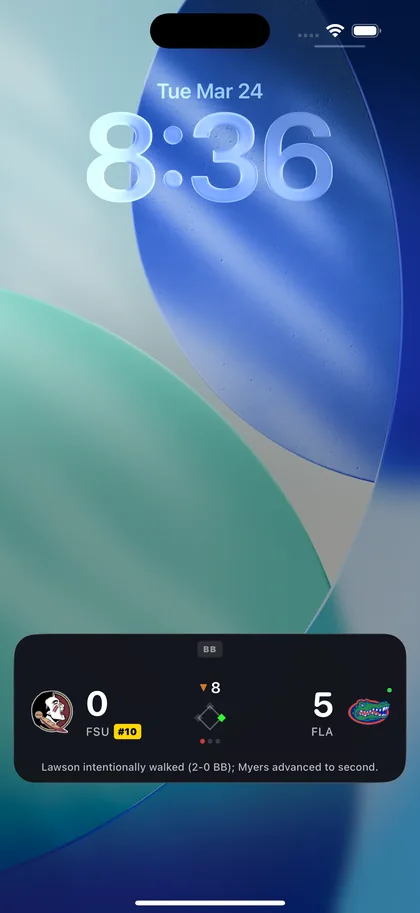
Full-bleed jumbotron-style score cards for every D1 baseball and softball game. Neon green illumination for the winning team, pulsing red live indicators, inning-by-inning line scores, situational diamond with baserunners and ball-strike-out counts, win probability bars, full box scores with batting and pitching tables, and a play-by-play feed with scoring plays highlighted. 30-second auto-refresh for live games.
iOS Live Activity widgets show real-time game updates directly on the lock screen and Dynamic Island. Fans follow their favorite teams without even opening the app — score updates, inning status, and game state changes push automatically via WidgetKit.
Firebase Cloud Messaging delivers instant notifications for favorite teams — game start, scoring plays, final results, and close games. Users customize which teams and notification types they receive. A custom Node.js push server handles delivery and escalation logic.
Every D1 program gets a full profile page: team logo, record, conference standing, brand-colored UI tinted to the team's official colors, full ESPN schedule with results, roster grouped by position, team leaders (batting avg, HRs, strikeouts), stadium and coach info, team-specific news, and direct links to social media accounts.
ESPN Top 25 polls for both baseball and softball with rank change indicators. Conference standings for every D1 conference, sport-aware so schools in different conferences for baseball vs softball display correctly. Tap any team to jump to their full profile.
Seamless toggle between baseball and softball. The entire data pipeline — scoreboards, conference mappings, team directories, ESPN API paths, caches — adjusts automatically. Each sport is cached independently so switching back is instant.
Aggregated RSS feeds from D1Baseball, College Baseball Info, and other sources with smart tagging, conference filtering, bookmarks, and in-app Safari reader. Historical NCAA D1 records organized by category with record holder, school, value, and date.
A Python scraping and reconciliation pipeline aggregates data from NCAA, ESPN, and henrygd.me APIs. Handles 300+ baseball teams and 440+ softball teams with cross-source ID mapping, schedule scraping, logo auditing, and team metadata enrichment. The pipeline validates and cross-references thousands of records to handle the fragmented, inconsistent data landscape of college diamond sports.
A sensory-friendly community map application designed for neurodivergent individuals and their families. Users create profiles with specific sensory triggers — auditory, visual, physical, environmental — and the map filters local businesses and venues accordingly. Built as an installable PWA with offline support, Firebase backend, and interactive Mapbox navigation. The goal is simple: help people find spaces where they can exist comfortably.
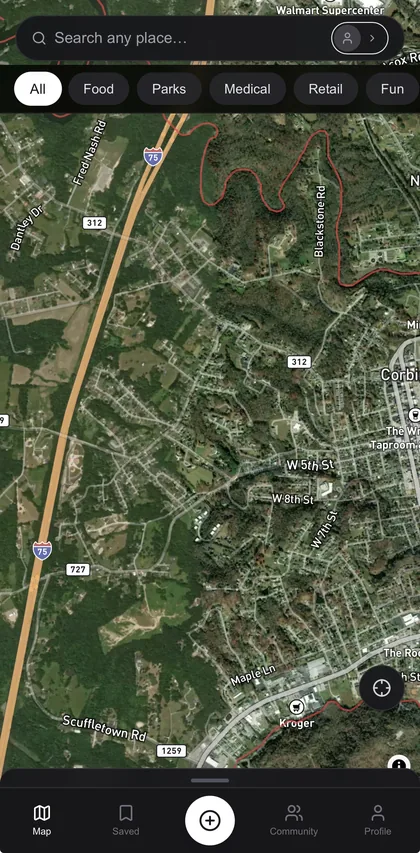
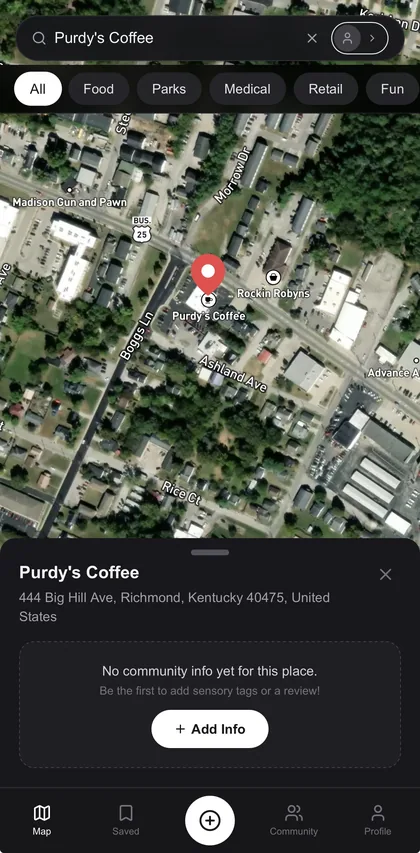
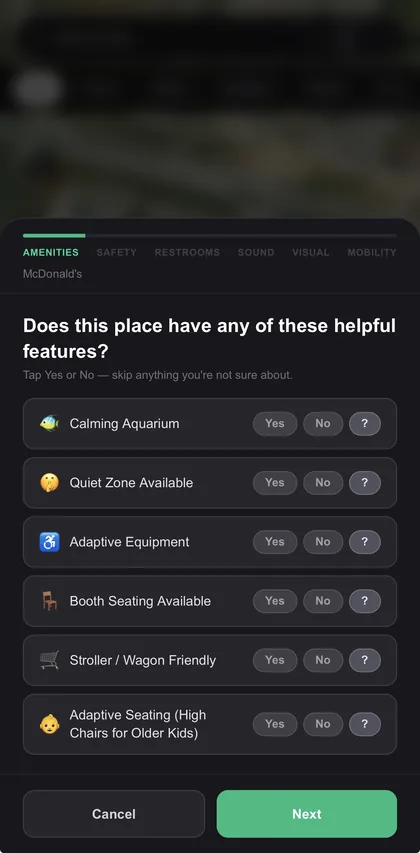
Users create individual profiles for themselves or family members, each with a nickname, avatar photo, and custom color. Profiles include a checklist of 13 sensory triggers across four categories: auditory (loud hand dryers, echo, background music, open grills), visual (ceiling fans, fluorescent lights, dim lighting), physical layout (cramped spaces, open water hazards), and restrooms (air dryers, automatic flush toilets). The map then filters venues based on which triggers are present.
A Mapbox-powered interactive map shows nearby businesses and community venues, filtered in real time by the active profile's trigger preferences. Users can tap any location to see detailed sensory information, read community reviews, and get directions. The map adapts its display based on which triggers the user wants to avoid.
Users can submit new locations and contribute sensory information about existing venues. A community-driven model keeps the map growing and up-to-date, with submissions stored in Firestore and reviewed before going live.
Built as a Progressive Web App with a custom service worker (Serwist) for offline support. Users can install it to their home screen on any device — iOS, Android, or desktop — and access cached map data even without a connection. Push notification infrastructure is in place for community updates.
The app supports multiple profiles per device, so a parent can create separate profiles for different children with different sensory needs. Switching profiles instantly re-filters the map. A "scout without a profile" mode lets users browse without setting up triggers first.
Firestore stores user profiles and venue data with real-time sync. Firebase Storage handles profile photo uploads with 5MB limits. Security rules protect user data while allowing community contributions. The admin SDK is available for server-side data management.

An interactive Kentucky basketball fan game featuring 75+ years of historical player data. Built with a custom data pipeline that scraped, validated, and cross-referenced thousands of records across every era of Kentucky basketball — stats, hometowns, jersey numbers, All-SEC selections, and more. Multiple game modes let fans test their knowledge and build dream lineups across generations.
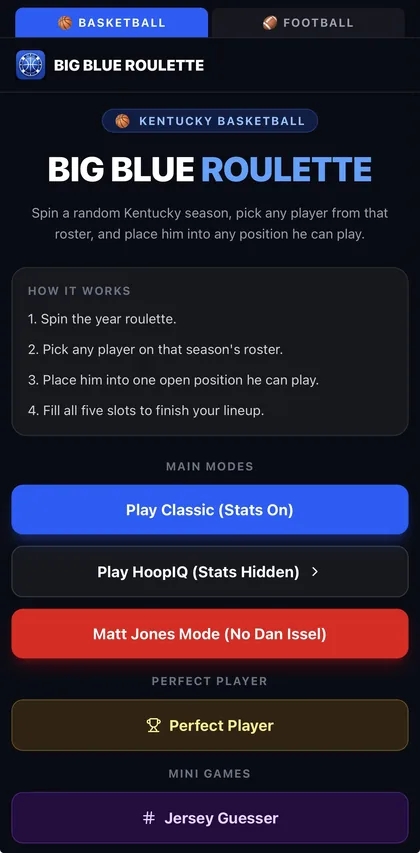
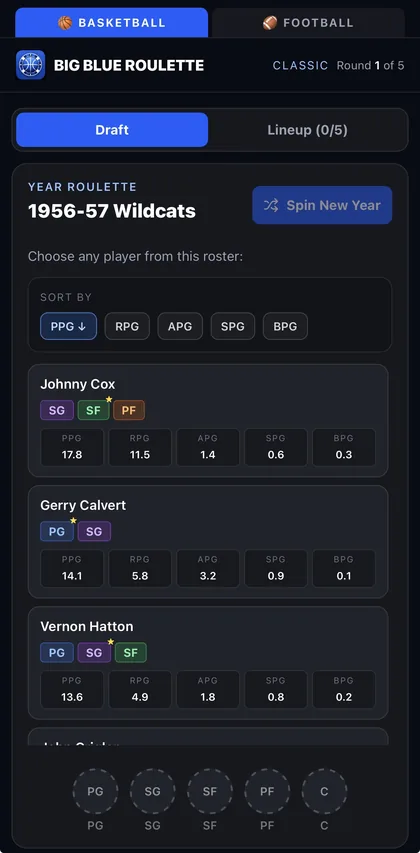
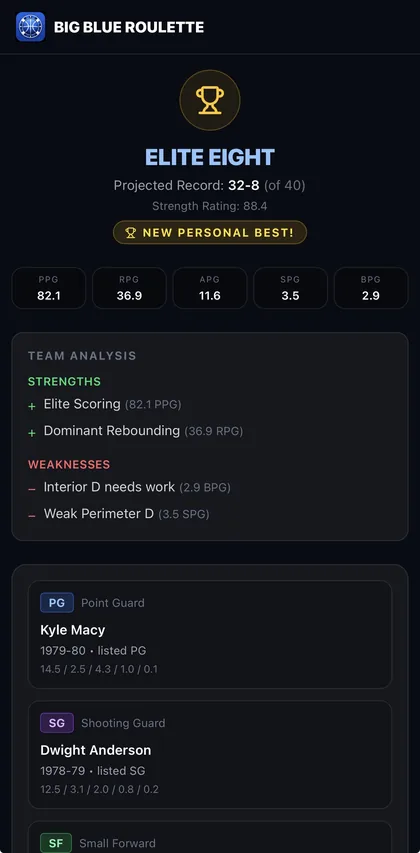
The core mode: a randomized draft where players are selected across all eras of Kentucky basketball. Users build a team from a shuffled pool, with position requirements, stat totals, and personal best tracking. The draft mechanics account for position flexibility (a SG can play PG or SF, etc.) and calculate team totals across points, rebounds, assists, steals, and blocks.
A full lineup constructor with a five-position court (PG, SG, SF, PF, C). Users select players for each slot, see aggregate stat totals, and compare against position-based benchmarks. Position flexibility rules allow players to slot into adjacent positions. A football lineup builder variant extends the same mechanics to Kentucky football.
A trivia mode where players match jersey numbers to the correct players across Kentucky basketball history. Includes difficulty scaling and a scoring system with personal best tracking via localStorage.
A geography-based trivia mode where players guess the hometowns of Kentucky basketball players. Features an interactive map interface and difficulty progression based on player obscurity.
A guessing game where the app picks a random Kentucky basketball player and the user asks yes-or-no questions to narrow down the identity. The game tracks questions asked, provides hints, and scores based on how few questions it takes to guess correctly.
A stat-based challenge where users try to build the "perfect player" by selecting stat categories and matching them to the player who holds the best mark in that category. Includes a shareable results graphic for social media.
A custom data pipeline scraped and validated 75+ years of Kentucky basketball history — player stats, hometowns, jersey numbers, All-SEC selections, coaches, and Naismith Award winners. Multiple audit reports cross-referenced data sources to fill gaps and correct mismatches. The same pipeline was extended to Kentucky football with separate player and stats datasets.
Game scores and achievements are persisted to localStorage with a clean personal best system. Users can track their best performances across all game modes, share results, and reset progress. Shareable graphics let fans post their draft results and lineup builds to social media.

A Next.js assessment application built for Immanuel Baptist Church that helps members discover how God has uniquely wired them across five dimensions: Spiritual Gifts, Heart, Expertise, Experiences, and Personality. The app features a custom scoring engine for spiritual gifts, a personality archetype system with four archetypes, Google Sheets integration for data collection, a protected staff dashboard with role-based access, and shareable results infographics. From onboarding to results delivery, the entire experience is automated and self-hosted.
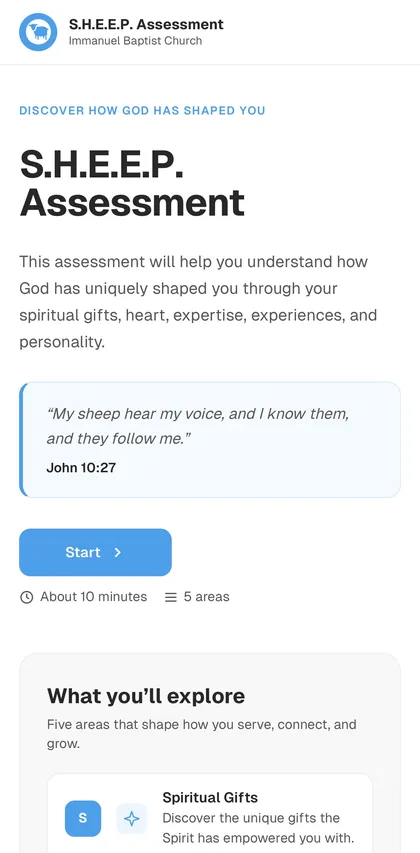
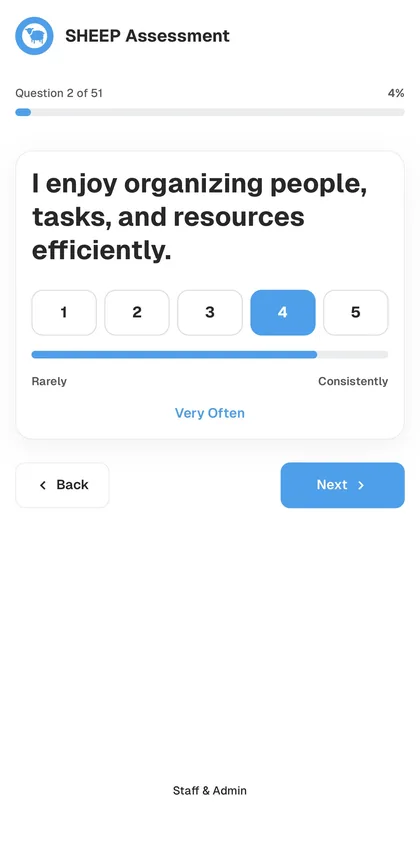
51 assessment fields across 5 sections, driven by a useReducer state machine with conditional branching, progress tracking, and validation at every step. Field types include 1–5 ratings, short text, drag-and-drop ranking (via @dnd-kit), multiple choice, fixed-count lists, and repeatable experience entries. An onboarding screen collects contact info before the assessment begins, with inline validation and campus selection.
9 spiritual gift categories — Administration, Evangelism, Exhortation, Giving, Mercy, Prophecy, Shepherding, Helps/Service, and Teaching — each measured by 3 rating questions (27 total). Scores are calculated as percentages with tie-aware top gift computation. Results display as ranked cards with progress bars, and the top 3 gifts (ties included) are highlighted.
4 archetypes — The Ram, The Shepherd, The Woolmaster, and The Bellwether — derived from 7 personality questions via an additive scoring matrix. Each archetype includes a description, contribution, strengths, and watch-outs. Confidence levels (clear, close, tie) are computed based on score margin, with deterministic tie resolution using discrimination questions and fallback ordering.
A 6-tab workbook architecture serves as the data store: People (canonical profiles with upsert logic), Assessment Responses (append-only), Answer Details (one row per answer with structured type support), Gift Scores (9 rows per submission with ranks), Submissions (summary view), and Config. Idempotent submissions use a delete-then-append strategy. Person matching by email/phone prevents duplicates. Custom setup, initialization, backfill, migration, and repair scripts handle workbook lifecycle.
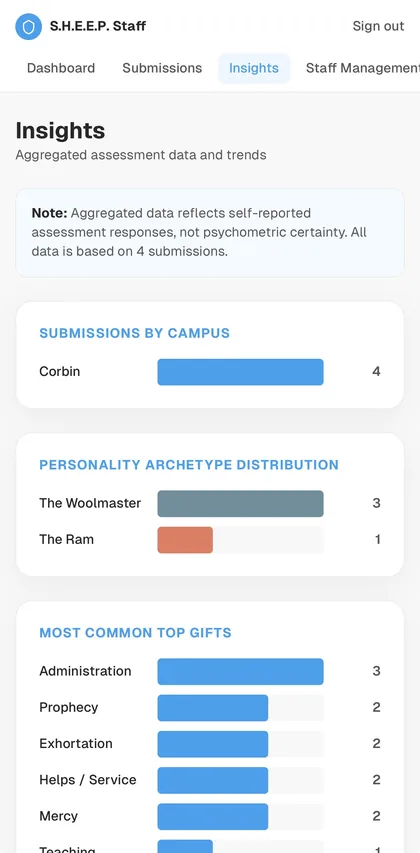
A full in-app staff interface with Better Auth authentication, invite-only registration, role-based access (Super Admin, Staff Viewer), invitation system with email delivery, password reset, and audit logging. Features include a dashboard with metrics and charts, filterable/paginated submissions table, full submission detail views, person profiles with submission history, and aggregated insights (campus distribution, archetype distribution, gift averages, trends). All charts are hand-built CSS/SVG — no chart library.
Participants can preview a branded 1200×900 infographic of their results, export it as a PNG via html-to-image, share via native device share sheets, or copy a text summary. Privacy controls let users toggle name and campus visibility. The export uses an offscreen render node with exact dimensions, waits for font loading, and handles feature detection across browsers.
After a successful submission, a results email is automatically sent via Resend to the participant's onboarding email. The email includes their top 3 spiritual gifts with descriptions and scripture references, all 9 gift score percentages, personality archetype (primary and secondary), and personality trait labels. Email failures are caught and logged without affecting the submission.
A PeopleDestination interface is implemented for Google Sheets now, with a clean architecture seam for future Planning Center integration. A new PlanningCenterPeopleDestination class can implement the same interface and be injected after the person upsert step — without changes to the onboarding UI or scoring system. Person records include planning_center_person_id, sync_status, and last_synced_at fields.
A church vehicle reservation system built for Immanuel Bible Church. Users can reserve church buses and vans, check them out, and check them back in with fuel levels and maintenance issue reports. Admins can manage the entire fleet, view reservations across a monthly calendar, manage users, and schedule recurring weekly reservations. The app is a installable PWA with automated email notifications, overdue reminders, and a full admin dashboard.
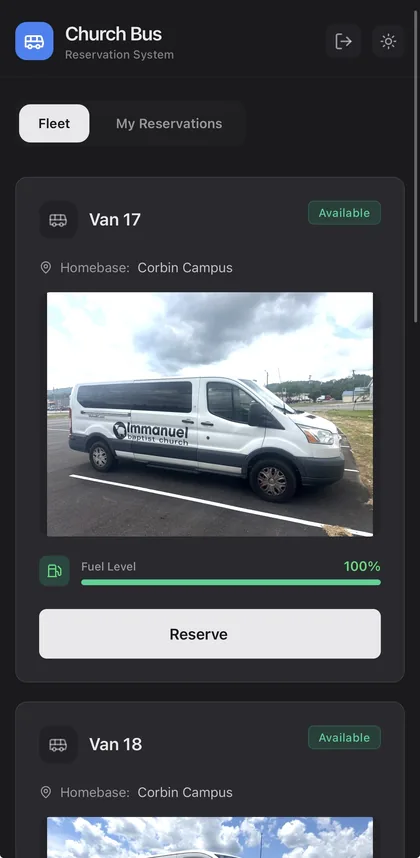
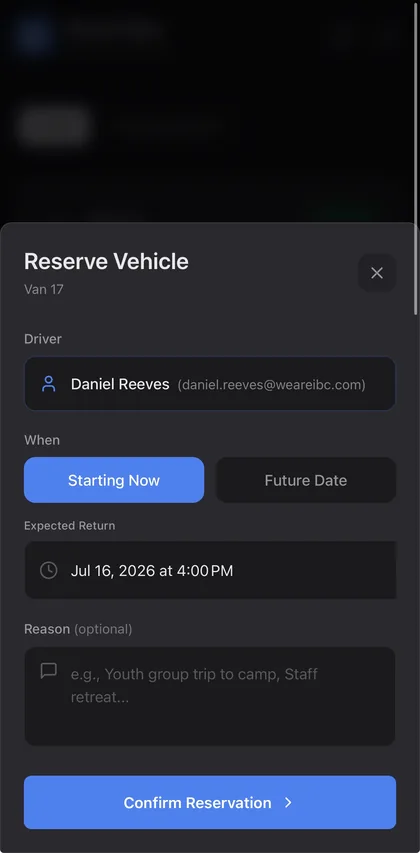
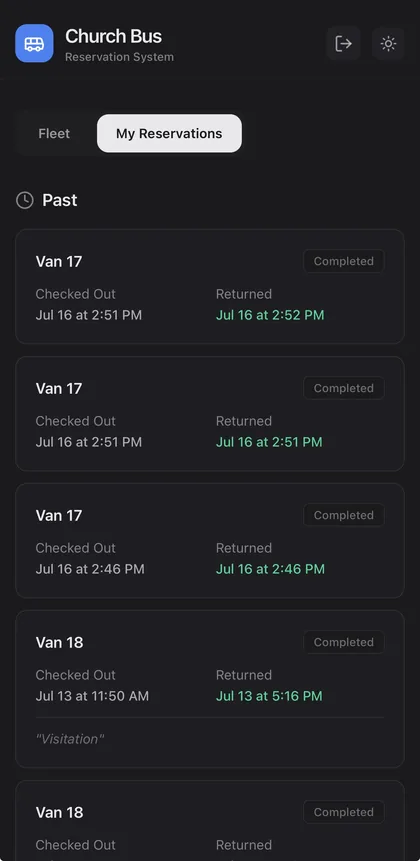
Admins can add, edit, delete, and reorder vehicles with full metadata — make, model, year, mileage, VIN, license plate, and homebase location. Vehicle photos are uploaded to Supabase Storage. Vehicles can be blocked to hide them from users, and display order is fully customizable with drag-to-reorder support.
Users select a vehicle, choose a start time (now or future) and expected return time, and optionally add a trip reason. The system checks for time conflicts with existing reservations and warns about same-day bookings. When a reservation starts, the vehicle is automatically marked as occupied. Users can cancel future reservations or return vehicles early.
On return, users select the fuel level (5 color-coded levels from full to empty), report any maintenance issues in a free-text field, and must confirm trash removal before completing the check-in. The vehicle status updates to available, fuel level is recorded, and a confirmation email is sent to the driver and notified admins.
Admins can create weekly recurring reservation series — selecting a user, vehicle, day of the week, start and end times, series start date, and number of weeks ahead. The system generates individual reservation rows for each week with DST-safe date handling. Series can be deleted, which removes future unchecked-out reservations while preserving completed ones.
Three Supabase Edge Functions handle email via the Resend API: reservation confirmations on booking, check-in confirmations on vehicle return (with on-time vs. late indicator), and escalating overdue reminders. Overdue reminders are triggered by a pg_cron job every 30 minutes — first at 1 hour past due, then every 12 hours — with deduplication tracking in a dedicated database table.
A dedicated calendar page shows a monthly grid with reservation indicators on each day. Users can click any day to see reservation details, navigate between months, and view a list of all upcoming reservations below the calendar.
A five-tab admin interface: Fleet Management (CRUD, reordering, image upload, blocking), Maintenance Log (last 20 completed reservations with issue reports), Reservations (admin booking, active/upcoming/past views, force-end), Users (edit profiles, toggle admin and notification preferences), and Recurring (create and manage weekly series).
Built as a Progressive Web App with auto-update service worker registration, offline caching for JS, CSS, HTML, icons, and images. Users can install it to their home screen on any device. A custom update prompt appears when a new version is available, with skipWaiting and clientsClaim for seamless updates.
About

Daniel Reeves lives in Corbin, Kentucky with his wife Haylie and their three children: Asher, Judah, and Ellie. He oversees audio, visual, and technical production across three campuses at Immanuel Baptist Church, and his background is in music and theology — not software engineering.
In the summer of 2025, Daniel had an idea for a Kentucky basketball fan game. Using AI-assisted development, he built the core of Big Blue Roulette in about an hour. It went viral overnight — 50,000 plays on day one and 150,000 the following week. People started reaching out asking if he could build something for them. That led to the launch of Reeves Digital Systems.
Daniel isn't a traditional developer, and that's the point. He understands what it's like to have a great idea and no way to execute on it without spending thousands and waiting months. AI changed that equation, and now he helps other businesses and organizations do the same thing — turn ideas into working software without the traditional barriers.
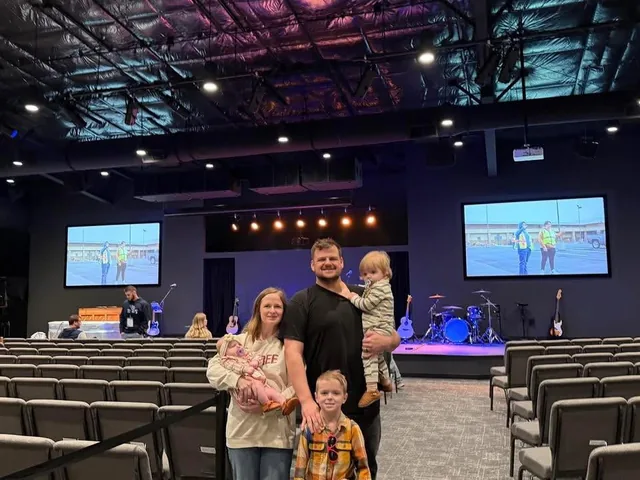

“AI lowers the technical barrier, but it doesn't eliminate the quality barrier. You still have to have the idea, the marketing game plan, and the playbook to make a good thing. It's not just an easy button — it's taking your knowledge and your experience and allowing it to flourish in a new way.”
Daniel Reeves, Founder
Private, Fixed-Scope Pricing
Every project is scoped around the actual outcome, users, workflows, integrations, and support needs. Reeves Digital Systems does not bill hourly for initial builds. Instead, projects are quoted as fixed-scope builds with clear milestones, deliverables, and payment checkpoints.
The first step is a free fit call. If the project is simple, I may be able to provide a fixed proposal after that conversation. If the project is more complex, the next step is a paid Software Blueprint so the scope, timeline, technical requirements, and build price are clear before development begins.
Use the contact form to share your idea, goals, users, timeline, and whether Reeves Digital Systems is the right fit.
Software Blueprint
Some projects are simple enough to quote after an initial call. Others need more planning before a responsible build price can be given. For custom apps, portals, AI tools, dashboards, SaaS products, or projects with integrations, Reeves Digital Systems may recommend a paid Software Blueprint before development begins.
The blueprint keeps the project from being vague, protects the budget, and gives both sides a clear plan before development starts.
Ownership
You own the final code, project files, hosting accounts, database, domain, content, and customer data after final payment is received. Reeves Digital Systems is built around no lock-in, clear handoff, and client-owned infrastructure whenever possible.
You are never locked in. If you ever want to bring development in-house or work with another developer, you can. Everything transfers cleanly because it was yours from the start.
Process
We talk through your idea, problem, users, budget expectations, timeline, and what a successful first version would look like.
For more complex builds, we map out the scope, screens, workflows, integrations, data needs, and technical approach before quoting the full build.
You receive a clear proposal with scope, deliverables, milestones, timeline, payment schedule, and what is not included.
The project is built in focused phases with progress updates, feedback checkpoints, and working demos along the way.
We deploy the project, test the core workflows, and hand off the code, accounts, documentation, and access after final payment.
After launch, ongoing support, improvements, maintenance, and new features can be handled through a monthly support plan or separate project quotes.
How Payments Work
Initial builds are billed by milestone, not hourly. A kickoff payment is required before development begins, with remaining payments tied to agreed project milestones such as prototype, beta, or launch. The exact payment schedule depends on project size and scope and is included in the proposal.
Support & After Launch
Every build includes a short post-launch bug-fix window for the agreed-upon scope. Ongoing support, updates, monitoring, small improvements, and new features are handled through a monthly support plan or separate quotes.
A bug fix means an agreed feature is not working as intended. A new request, new workflow, redesign, or added feature is quoted separately or handled through an ongoing support plan.
Scope Boundaries
FAQ
No. Initial builds are quoted as fixed-scope projects. This keeps the focus on the outcome, not the number of hours it takes to build.
Sometimes, if the project is simple. For custom apps, portals, dashboards, AI tools, SaaS products, or anything involving integrations, the next step is usually a paid Software Blueprint before a full build price is quoted.
Complex software has too many moving parts to responsibly quote from a short conversation. The blueprint defines the features, workflows, screens, data, integrations, timeline, and launch plan before development begins.
The client owns the finished code, project files, data, and infrastructure after final payment is received. Reeves Digital Systems does not build around lock-in.
Each project includes a short bug-fix window for the agreed scope. After that, ongoing updates, improvements, monitoring, and support can be handled through a monthly support plan or separate quotes.
Not unless specifically stated in the proposal. Third-party costs such as hosting, domains, databases, AI usage, email delivery, APIs, and payment processing are separate from the build fee.
Most projects are completed within 3–12 weeks, depending on complexity. A custom internal tool might take 3–4 weeks, while a full SaaS platform can take 8–12 weeks or more. You'll get a specific timeline in your proposal before any work starts.
Get Started
Share your idea, goals, users, timeline, and whether Reeves Digital Systems is the right fit. Simple projects may move straight to a fixed proposal. More complex apps may start with a paid Software Blueprint.
No pressure, no sales pitch. Just a conversation about what you need and whether I can help.
I'll get back to you within 1–2 business days.